
Omarchy's AI Agent Friendliness: A Preliminary Exploration of Architecture, Infrastructure, and UX
If you only see Omarchy as yet another Linux customized desktop, rather than an Agent-native desktop OS, you might miss something. I'm just saying it's a possibility. This article is not a sermon, just a simple sharing after my intensive ten-day use of Omarchy.
Omarchy is not simply pre-installing a chatbot in a Linux desktop. It organizes the system into an Agent workbench suitable for human continuous supervision, delegation at any time, and quick takeover, through unified CLI, versioned Skills, Hyprland desktop control, Quickshell interactive interface, and mise tool supply chain.
Overall assessment: Omarchy is already very mature in terms of 'whether the Agent can discover and invoke system capabilities'; it is currently closer to an agent-ready desktop OS, and the main gaps to a strict agent-safe OS are unified capability policy, operation auditing, and transactional rollback.
Table of Contents
Background and Timeline
Omarchy's Agent workbench is not a demo project, but the product of a company's daily engineering practices:
From personal tool to company standard, and then to an infrastructure ecosystem with long-term funding, this timeline itself is evidence of the 'invest in general primitives rather than specific models' approach: the refinement of features like Crash Capture comes from daily feedback of real teams, and the unified AMD hardware baseline also provides a predictable environment for hw-* hardware detection and crash diagnosis.
Overall Architecture
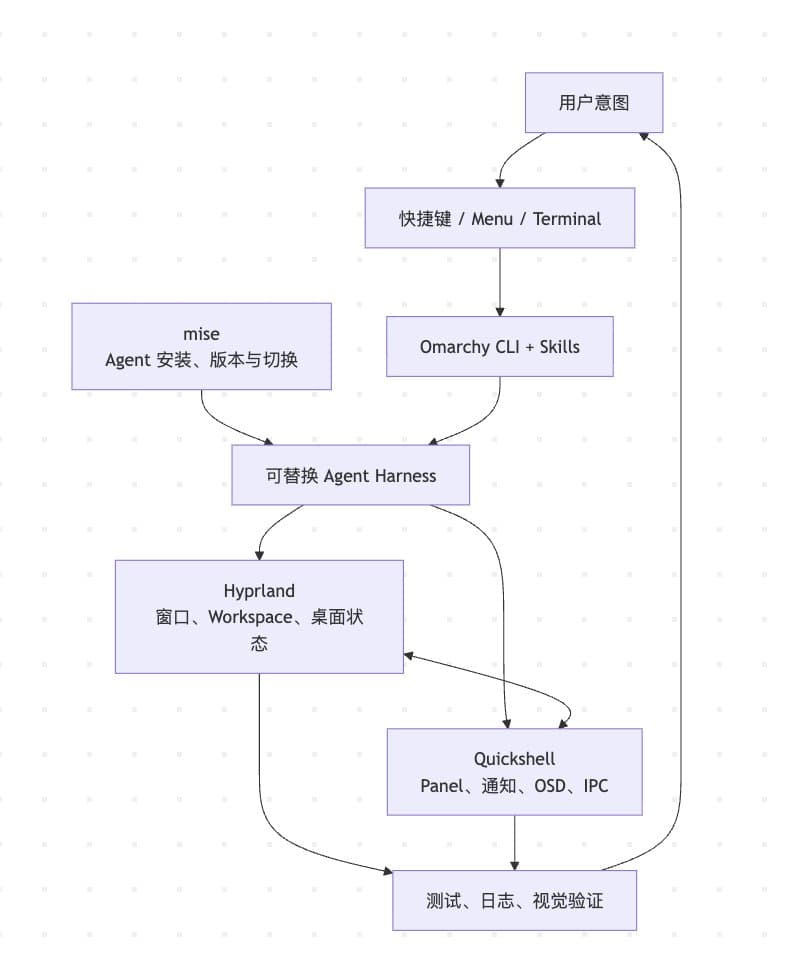
Source Code Architecture and Capability Interface
Omarchy converges over four hundred system operations (quattro currently registers 436 commands) into a unified entry point:
omarchy <group> <action>In the current source code, omarchy-* scripts automatically become commands via their filenames, and declare metadata in the file header (8 keys in total: group, name, summary, args, examples, aliases, hidden, requires-sudo):
# omarchy:summary=...
# omarchy:args=...
# omarchy:requires-sudo=true
omarchy commands --json outputs route, binary, group, arguments, examples, aliases, and the requires_sudo boolean. This is equivalent to a lightweight tool schema: the Agent can first discover capabilities and parameters, then execute commands, without having to guess menu coordinates or script names.
The router also includes protections suitable for automation:
The routing layer also has two noteworthy designs: each command simultaneously registers a canonical route and a filename route, so old syntax still works after metadata moves routes; dispatch uses a two-pass strategy—the fast path only does filename detection without parsing any metadata headers, and only aliases and moved routes fall back to full metadata parsing, thus maintaining low latency at the scale of over four hundred commands.
Omarchy is not tied to a single model vendor. Users can choose a default Agent from 10 harnesses: Codex, Claude Code, OpenCode, GitHub Copilot, Grok (xAI official CLI), Pi (badlogic's coding agent), Oh My Pi, Ori (OpenRouter's harness), Crush, and Antigravity (formerly Gemini CLI entry).
The unified launcher is responsible for:
Therefore, the desktop remembers the role of 'Agent', not a specific product. After changing the Agent, shortcuts, window rules, workspaces, and user muscle memory remain unchanged.
During the user finalize phase (omarchy-provision-user), Omarchy links built-in Skills (currently two: omarchy and diagnose-crash) to the convention directories of multiple harnesses:
Skills encode not encyclopedic knowledge, but operational constraints corresponding to the current Omarchy version:
This is more reliable than relying on possibly outdated online tutorials, because knowledge and implementation are upgraded together with the same software package.
Omarchy divides state into:
/usr/share/omarchy package-owned source and defaults, read-only reference
~/.config user-intentionally maintained configuration and overlays
~/.local/state/omarchy generated state, current theme, migration and run records
User files are generated through three phases: seed, finalize, and explicit resync. Therefore, the Agent can more easily determine whether to modify user configuration, default templates, or migration scripts, and is less likely to mistake temporary generated files for authoritative configuration.

The repository also provides:
This enables the Agent to follow a closed loop of 'small-scope modification → focused testing → runtime verification', rather than declaring completion based solely on code appearance.
The speed ceiling of the verification loop is determined by local computing power. 37signals' actual measurement: HEY's Rails test suite runs nearly twice as fast on a Framework Desktop running Linux compared to the fastest Mac (M4 Max), and runs natively in Docker. Fast local testing is not just developer experience—it directly determines the physical duration of each 'modify → test → verify' iteration for the Agent.
Omarchy's capability discovery and execution experience is strong, but the security model still leans towards smooth execution: the default Agent launcher injects auto-approve, allow-all, or similar no-confirmation switches for 8 out of 10 harnesses (only Pi and Ori lack corresponding parameters).
Command semantics not yet uniformly expressed include:
The most valuable improvement in the next phase is to supplement commands with effect metadata, and have the OS enforce capability, audit, and transaction policies.
Hyprland, Quickshell, mise Collaboration
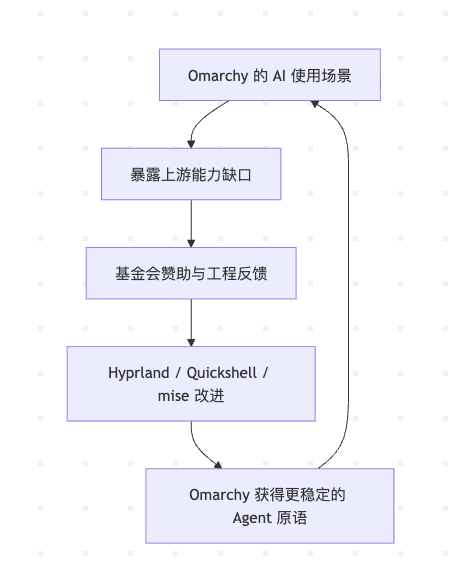
Omacom Foundation sponsors Hyprland (exclusive sponsorship, 3 years + 2-year renewal option), Quickshell, and mise (all Premier level), which can be understood as a vertical investment in the Agent execution stack, not just general support for three dependency projects.
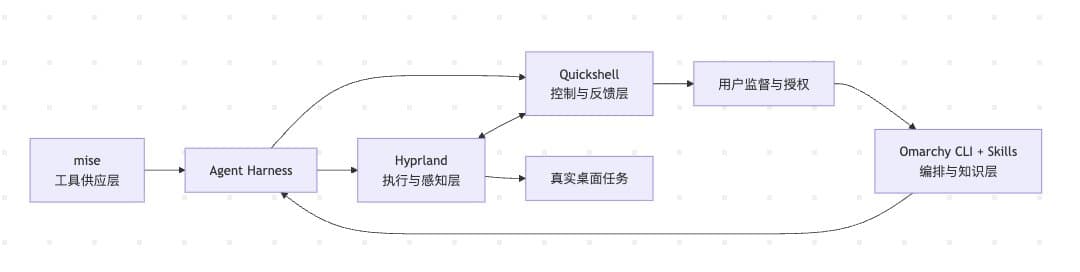
mise provides a unified installation and runtime method for Agent CLIs from different sources:
npm / GitHub Releases / registry / runtime backend
↓
mise
↓
codex / claude / opencode / pi / ori ...
Omarchy only pre-installs lightweight lazy wrappers; the actual tools are downloaded on first run. Each wrapper invocation executes mise use -g, making it also an upgrade point. This achieves both out-of-the-box usability and low image size, while converging installation, version resolution, upgrades, and PATH management into a single mechanism.
The strategic value is that models and harnesses change rapidly, but tool provisioning and version management are long-term stable infrastructure. Supporting mise avoids Omarchy having to maintain another Agent package management system.
Hyprland exposes extensive structured desktop state via hyprctl:
hyprctl clients -j
hyprctl monitors -j
hyprctl activewindow -j
hyprctl devices -j
Agents can accurately query windows, workspaces, monitors, focus, and input devices, and perform operations such as window focusing, moving, layout, DPMS, transparency, and screenshots via dispatch or the Lua API.
This is superior to relying on visual recognition and mouse coordinates: JSON state is more stable, faster, and easier to test.
The unified org.omarchy.agent app-id further abstracts various harnesses into a single desktop role, decoupling window rules, themes, workspaces, and focus behavior from specific models.
Omarchy Shell is a long-running Quickshell instance that hosts:
CLI and GUI operate on the same runtime state via IPC, e.g., summon plugin, reload config, apply theme, adjust bar widget, list plugins, and output effective configuration.
Thus the same system action can have multiple entry points:
Human: hotkey or menu
Agent: omarchy CLI
System: notification, hook, systemd service
↓
Quickshell IPC
↓
same desktop state
The Agents panel turns subscription quotas, token usage, and model distribution into system indicators like network or battery. Each Agent collector writes to local JSON; Quickshell only observes and renders. Adding a new Agent does not require rewriting the entire UI.
Startup
Hyprland hotkey
→ omarchy-agent
→ mise ensures harness availability
→ Hyprland creates unified Agent window
→ Quickshell presents Agent status
Customization
Natural language request
→ Skill provides configuration boundaries
→ Agent modifies ~/.config
→ Quickshell hot-reloads or IPC reloads
→ Hyprland reloads/dispatches
→ Agent verifies via JSON/IPC
Update
omarchy update
→ OS package update
→ mise updates harness
→ Skills sync with package
→ Quickshell/Hyprland configuration migration
Sponsorship enables Omarchy to feed real AI desktop scenarios back upstream:
This is more sustainable than investing in a specific model. No matter who the mainstream Agent is in the future, it will still need these three universal primitives: tool provisioning, desktop control, and human-machine feedback.
UX, Hotkeys, and Tiling Workflow
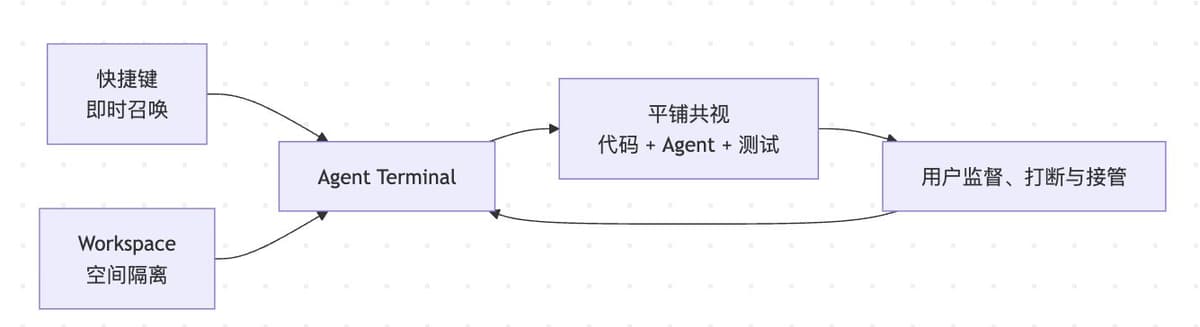
Omarchy does not invent an isolated chat interface for AI; instead, it embeds Agents into the existing keyboard-driven, tiling window, workspace, and terminal workflow.
The default Agent is elevated to a system-level action. Users can summon the Agent instantly via a hotkey from any application and workspace, without first opening a browser, navigating to a chat website, or reselecting a project.
With lower invocation cost, AI serves not only large tasks but also frequent small ones: explaining errors, modifying hotkeys, adjusting window rules, analyzing screenshots, or reviewing the current project.
Hotkeys express stable intent rather than volatile GUI coordinates. They also form a transition from human operation to programmable interfaces:
Mouse click
→ Hotkey expresses intent
→ omarchy CLI
→ Hyprland / Quickshell IPC
A typical Agent development layout can simultaneously present:
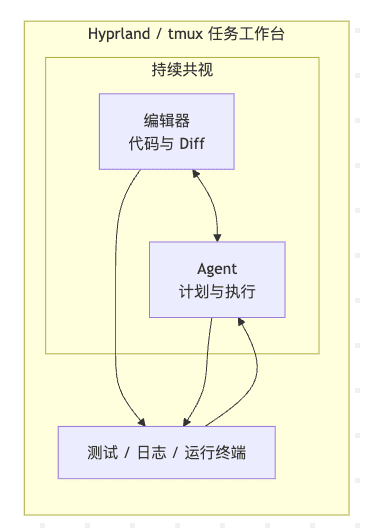
Users can see the Agent's commands, code diffs, test results, and run logs at the same time. This transforms the Agent from an asynchronous black box into a continuously supervised executor.
Omarchy's tmux helpers further provide (all require being inside a tmux session):
tdl <agent>: editor (left), Agent (right 30% column), terminal (bottom); agent parameter is required.tdl <agent1> <agent2>: second Agent stacked vertically inside the right column.tds: fixed four-pane layout with editor (nvim), diff watcher, terminal, and an opencode pane.tsl <count> <command>: tile any command across N panes; passing an agent command yields an Agent swarm.tdlm <agent>: open a tdl window for each subdirectory.Multi-pane is a lightweight, visual multi-Agent orchestration; however, multiple Agents operating on the same working tree may conflict, so it is best combined with git worktree.
Different workspaces can host different task contexts: main project, running applications, documentation browser, and temporary Agent. An Agent can continuously compile or test in a special workspace while the user continues working in the main workspace, switching back quickly when needed.
Spatial layout itself is a form of external memory: users know "code on the left, Agent on the right, verification below" without repeatedly rebuilding context across multiple full-screen windows.
Hotkeys are efficient but hard for new users to remember. Omarchy Menu, CLI, and hotkeys form a three-tier entry:
New users: Menu for discovery
Experienced users: Hotkeys for execution
Agent: CLI invocation
All three are organized around shared vocabulary such as theme, refresh, toggle, capture, plugin. Users can directly use concepts seen in the menu in their prompts, and Agents can map to the same CLI commands.
Agents run by default in a regular PTY terminal, not a hidden background service:
This is a simple yet powerful supervision interface.
Region screenshots, OCR, screen recording, and clipboard history can turn on-screen phenomena into Agent context actively selected by the user:
Screen phenomena
├── Screenshot → visual analysis
├── OCR → text analysis
├── Screen recording → timing issues
└── Clipboard → prompt or file
Compared to continuously reading the entire screen by default, this explicit capture is easier to understand and more aligned with the principle of privacy minimization.
Next steps could combine workspace, git worktree, Agent pane, test pane, and snapshots into a formal task workspace, upgrading the tiling UX from "convenient Agent launch" to visual task orchestration.
Crash Capture: How System Events Become Agent Tasks
Crash Capture is the most representative example of Omarchy Agent integration. It does not automatically upload core dumps to a model; instead, it organizes system facts, rule filtering, user authorization, domain Skills, and upstream feedback into a complete pipeline.
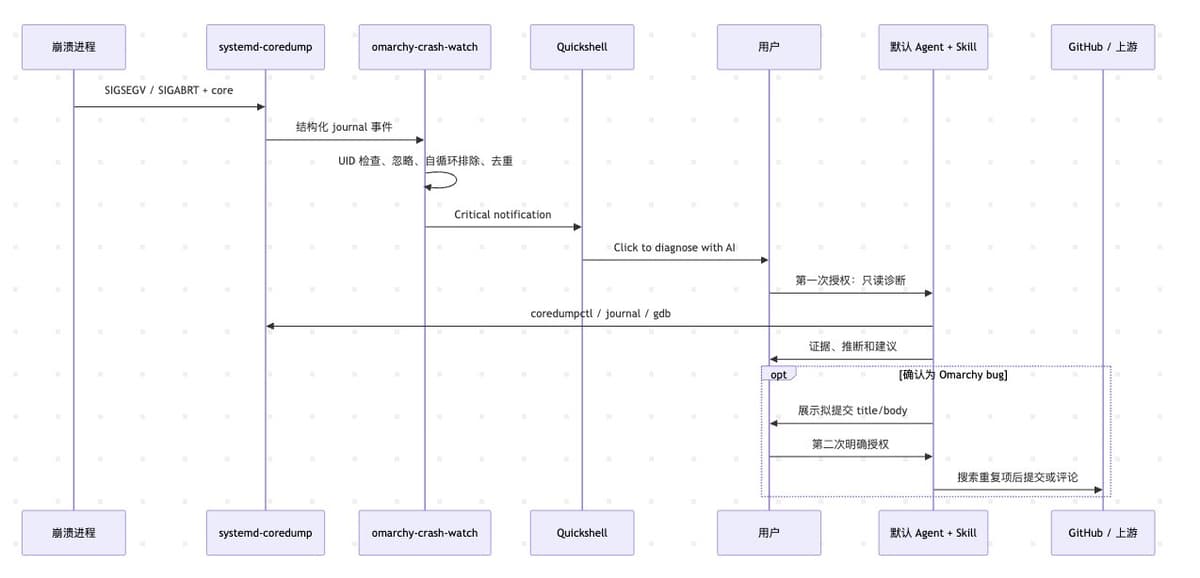
The watcher subscribes to journal JSON with a fixed MESSAGE_ID from systemd-coredump, rather than matching random log text. The event includes the current user, process name, PID, executable, signal, and timestamp.
Thus the Agent's starting point is not "the desktop seemed to disappear just now" but a fact already confirmed by the system:
process: quickshell
PID: 12345
binary: /usr/bin/quickshell
signal: SIGSEGV
time: ...
omarchy-crash-watch completes the following before calling AI:
This deterministic triage reduces noise, token consumption, and model misjudgment.
The notification only writes:
Process crashed:
Click to diagnose with AI
Detection and evidence preservation happen automatically, but the Agent is launched only after the user clicks. The button authorizes "diagnosis," not automatic repair or automatic reporting.
When Quickshell itself crashes, the notification server temporarily disappears. The Watcher waits for the restarted shell to reacquire the D-Bus name (up to 10 seconds), then re-sends the notification, preventing the most worthy-to-diagnose shell crash from being silently lost; if it times out, it discards that notification and does not start the deduplication window.
The click action uses discrete argv to pass PID, process name, path, and signal, without using sh -c concatenation, preventing malicious process names from being re-parsed as commands.
omarchy-agent-crash is only responsible for:
Specific investigation methods are defined by the Skill, not hardcoded in the launcher:
Event adapter: omarchy-agent-crash
Diagnosis strategy: diagnose-crash Skill
Execution engine: user-selected Codex, Claude, OpenCode, etc.
This way, all harnesses share the same set of diagnosis methods, updated with Omarchy versions.
The Skill requires the Agent to:
A core dump is a copy of the process memory, which may contain passwords, tokens, personal documents, and API keys. Therefore, the Skill requires:
The Skill has no explicit "no upload" clause, but the combination of read-only and delete-on-exit effectively eliminates the possibility of handing the core over to an external service.
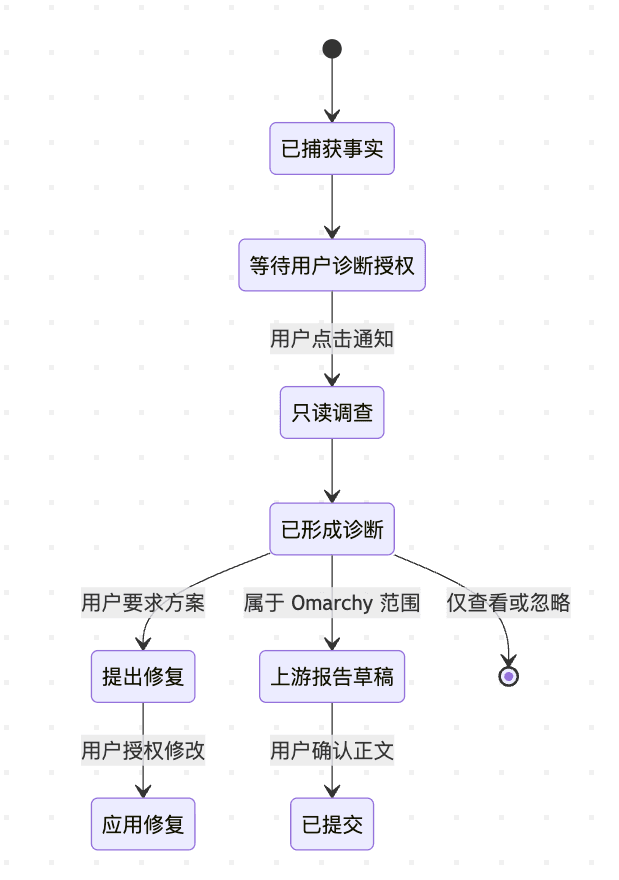
When the user clicks "Diagnose," they only authorize reading and analysis, not uninstalling packages, modifying configurations, restarting services, or deleting data.
Only when evidence shows the issue is indeed within Omarchy's control does the reporting process begin. Crashes of third-party applications should generally be reported to their upstream, not Omarchy.
Before submission, all of the following must be met:
Then, search open and closed issues to avoid duplicate reports; if an issue already exists, only add a comment if new evidence is available. Machine-generated reports must indicate the model and harness.
Crash Capture can be generalized to update failures, disk anomalies, network faults, or performance degradation:
Facts captured by the OS
Noise filtered by rules
Intent confirmed by the user
Methods constrained by Skills
Execution performed by replaceable Agents
External side effects require re-authorization
The next step could introduce a dedicated capability profile for crash diagnosis, allowing only coredumpctl, journalctl, gdb, and read-only queries; while outputting structured diagnostic JSON, and splitting "diagnose," "propose fix," "apply fix," and "upstream report" into four independent authorization stages.
Outlook: Local model runtime layer
This is the only chapter marked as "Outlook" in the full text: the following scheme does not exist in the quattro source code; the discussion targets a design sketch circulating in the community, not an implemented or announced roadmap.
The current Omarchy Agent stack has a structural gap: all models are in the cloud. mise manages harness installation, the Agents panel monitors cloud subscription quotas and token usage, and all 10 optional Agents connect to various cloud APIs. Quattro has actually built half a bridge to the local side — the Install > AI menu presets installation items for LM Studio and Ollama, and the Ollama one even detects nvidia-smi / rocminfo to automatically select the ollama-cuda / ollama-rocm package, making it hardware-aware. But the bridge stops there: installed local models have no connection to any Agent, and there is no mechanism to register them as a provider for any harness.
The circulating sketch completes the missing second half of the bridge (the omarchy-ai-* commands and omarchy-local-ai container in it do not exist in the current source code):
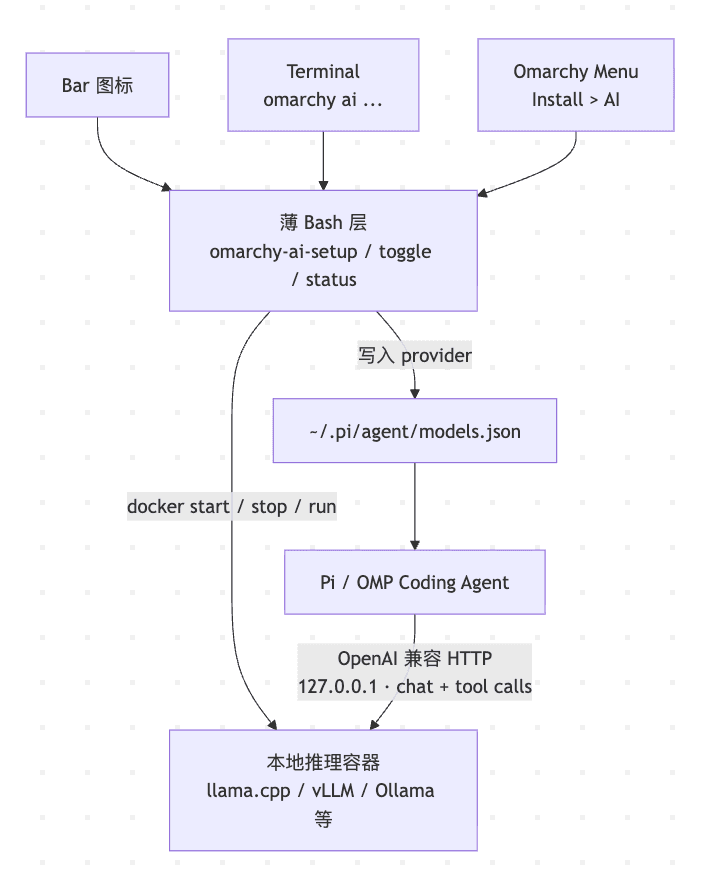
The most valuable sentence in the sketch is: "The agent never knows Omarchy exists — it just sees an OpenAI-compatible URL in its own config." Omarchy is responsible for container lifecycle and provider registration; the Agent only faces a standard protocol endpoint.
This is completely isomorphic to the pattern repeated throughout this article:
The sketch is currently just a conceptual diagram. Formalization requires solving at least three things:
The GPU matrix (NVIDIA/AMD/Intel, VRAM, quantization formats) and the first model download experience determine that omarchy-ai-setup will not be a simple script, but another setup- prefixed hardware-aware wizard.
With this layer added, Omarchy's privacy boundary story is complete. Crash Capture ensures core dumps stay local; the local provider keeps prompts and code local as well. Users can choose based on the task: private code uses local models, high-difficulty tasks use cloud flagship models, offline environments use local GPU—while keyboard shortcuts, window rules, Skills, and the supervision interface remain unchanged, because the desktop still remembers the role of 'Agent'. At that point, Quickshell also has a ready-made presentation location: the cloud Agents panel monitors subscriptions and tokens, the local panel monitors GPU, models, and throughput, complementing each other.
Summary
Omarchy's core advantage is not a specific model, but rather the integration of the tool supply, system knowledge, desktop execution, interactive feedback, and verification processes required by an Agent into a replaceable, observable, and supervised runtime environment. Omacom Foundation's support for Hyprland, Quickshell, and mise establishes this capability on long-term, general-purpose desktop infrastructure, rather than tying it to short-lived AI products.
There is another layer that closed-source desktops cannot provide: the Agent runs on a system where the source code is fully readable. The read-only reference layer at /usr/share/omarchy means the Agent can directly read the implementation of the entire desktop it runs on—checking Quickshell plugin source code when diagnosing a crash, reading default templates when modifying configuration. On macOS or Windows, the Agent faces a black-box OS; an agent-ready desktop can only grow on an open-source stack.
The most important direction for the next phase is to supplement the existing smooth experience with OS-level capability policy, structured effect metadata, operation auditing, and transactional rollback, enabling Omarchy to evolve from an agent-ready desktop to an agent-safe desktop.