Best Practices for Non-Designers Using AI to Create UI: Evidence, Boundaries, and Methodology
TL;DR
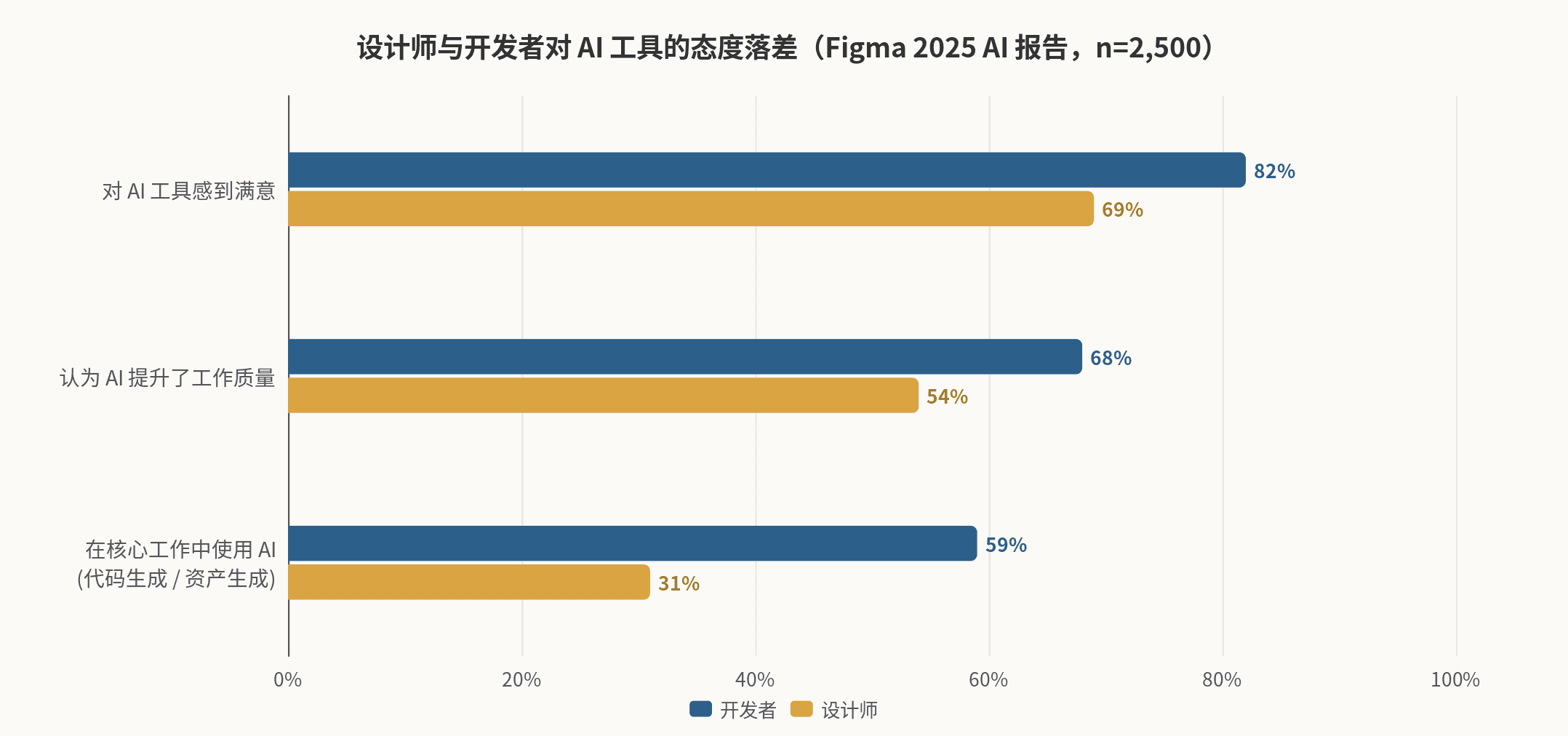
Yes, but with strict prerequisites. Evidence from 2025–2026 shows that AI can already raise the "floor" of UI output above the passing line—in the academic benchmark Design2Code's human evaluation, GPT-4V generated web pages that were deemed capable of replacing the original page in about half of the cases (arXiv.org); a Figma survey of 2,500 practitioners also showed that 78% believe AI has significantly improved efficiency (Figma). However, the same survey found that only 32% trust AI's output (Figma)—a chasm lies between efficiency and quality, and bridging it requires not better models, but human judgment plus a closed-loop workflow. Those without design skills can produce "good enough" UI, provided they: outsource taste to references and design systems, outsource acceptance to heuristic checklists and automated scans, leave the final verdict to real users, and only deliver AI output directly in scenarios where "good enough is truly good enough" (MVP, internal tools, early validation).
1. Background: An Inflection Point Named "Vibe Design"
1.1 From Vibe Coding to Vibe Design
In February 2025, Andrej Karpathy proposed "vibe coding"—a workflow where intent is described in natural language, the model writes code, and humans only review the results. The term was selected as Collins Dictionary's Word of the Year in November of that year (AIDesigner Templates). The same logic quickly spread to the design side: vibe design refers to a workflow where "you describe the interface you want using natural language or visual references, AI generates the design, and humans are responsible for guiding, curating, and correcting" (AIDesigner Templates). This concept truly broke into the mainstream in March 2026—Google upgraded its Stitch tool (originating from the 2025 acquisition of Galileo AI, released as a lab project at Google I/O 2025) into an infinite canvas workspace, directly using the term "vibe design" in its official copy; on the day of the announcement, Figma's stock price fell by approximately 12%, sparking a debate in the design community about whether "design is being industrialized and replaced" (Eleken).
It is worth emphasizing that this is not purely marketing-driven hype, but a paradigm shift supported by adoption rates. According to industry statistics, by early 2026, 67% of design teams had adopted AI tools in the concept generation and prototyping stages (Alloy); Figma's 2025 annual report (surveying 2,500 designers and developers) showed that the proportion of users building Agent-like AI products doubled from 21% to 51% within a year, and over 80% of designers and developers believe that "learning to collaborate with AI" is a prerequisite for future career success (Figma). Meanwhile, the Chinese ecosystem has also completed its corresponding layout: MasterGo (Lanhu) launched "AI Quick Build" supporting multimodal input of natural language, voice, and reference images, with generated results directly entering an editable canvas and capable of invoking enterprise design systems to constrain output (Mastergo); Modao supports generating editable high-fidelity prototypes from requirement copy in 30 seconds (Modao); while Jishi Design focuses on "AI revision"—using natural language to issue modification instructions on existing pages (WeChat Official Account (Zhi Xiaoyuan AI Talk)).
1.2 Tool Landscape: First Distinguish Three Categories
Before discussing "best practices," it is essential to distinguish three categories of tools that are often conflated, as their outputs, applicable roles, and risks are entirely different (Hedrick):
| Category | Representative Tools | Output | Suitable For | Main Risk |
|---|---|---|---|---|
| Prompt-to-Design | Google Stitch, Uizard, Banani, Galileo series, MasterGo AI Quick Build, Modao AI, Jishi Design | Editable design files/canvas layers | PMs, founders, non-design roles for quick visualization of ideas | Output tends to be "draft-like," with weak information hierarchy and brand consistency (Muzli - Design Inspiration) |
| Prompt-to-App | v0, Lovable, Bolt.new, Readdy | Runnable frontend code or even full-stack applications | Those with technical backgrounds, indie developers | Skips the design phase; homogeneity and accessibility defects go directly into code (SmoothUI) |
| AI Embedded in Professional Design Tools | Figma (First Draft / Make / MCP), MasterGo Design Assistant, Pixso | Design assets constrained by design systems | Teams with designer collaboration, scenarios requiring delivery and standards | High learning curve, limited free quotas (Hedrick) |
A recurring conclusion from practical tests is: AI generation tools are "accelerators for the ideation phase," not "replacements for the production phase" (Hedrick). A June 2026 experiment that used the same CRM dashboard prompt to evaluate six tools (Flowstep, Stitch, Figma Make, v0, Lovable, Bolt.new) is quite representative: v0 produced the most visually refined interface, closest to "shippable," but reviewers still noted that its spacing, hierarchy, and content priority "look good at first glance but need fixes upon closer inspection"; Stitch was the fastest and suitable for exploration, but its charts were hard to understand, information hierarchy was weak, and it was "far from production-ready" (Muzli - Design Inspiration). Independent reviews in the Chinese community reached almost identical conclusions: among domestic tools, MasterGo had the highest degree of integration (generated results can be inserted into the canvas for secondary editing and converted to code), but the reviewers admitted that "the current capabilities of these AIs are just for me to experience; I wouldn't actually use them in my work" (Everyone is a Product Manager).
2. Core Question: Can Those Without Design Skills Produce "Good Enough" UI?
2.1 First Define "Good Enough": It's a Layered Concept
"Good enough" is not an absolute standard but depends on the interface's purpose, audience, and cost of failure. Synthesizing various practices, a clear spectrum of passing grades can be drawn:
| Scenario | Definition of "Good Enough" | Can AI Direct Output Meet It? | Basis |
|---|---|---|---|
| Internal tools, personal scripts, one-time demos | Usable, error-free | Usually yes, AI direct output suffices | Vibe coding cases show non-designers can replicate the UI of Meta's production-grade internal tools within three days (ezyang's blog) |
| MVP, fundraising demos, stakeholder alignment | Understandable, explainable, quickly verifiable | Yes, but requires 1–2 rounds of manual fixes | AI output is generally positioned as a "strong starting point, not a finished product" (AIDesigner Templates) |
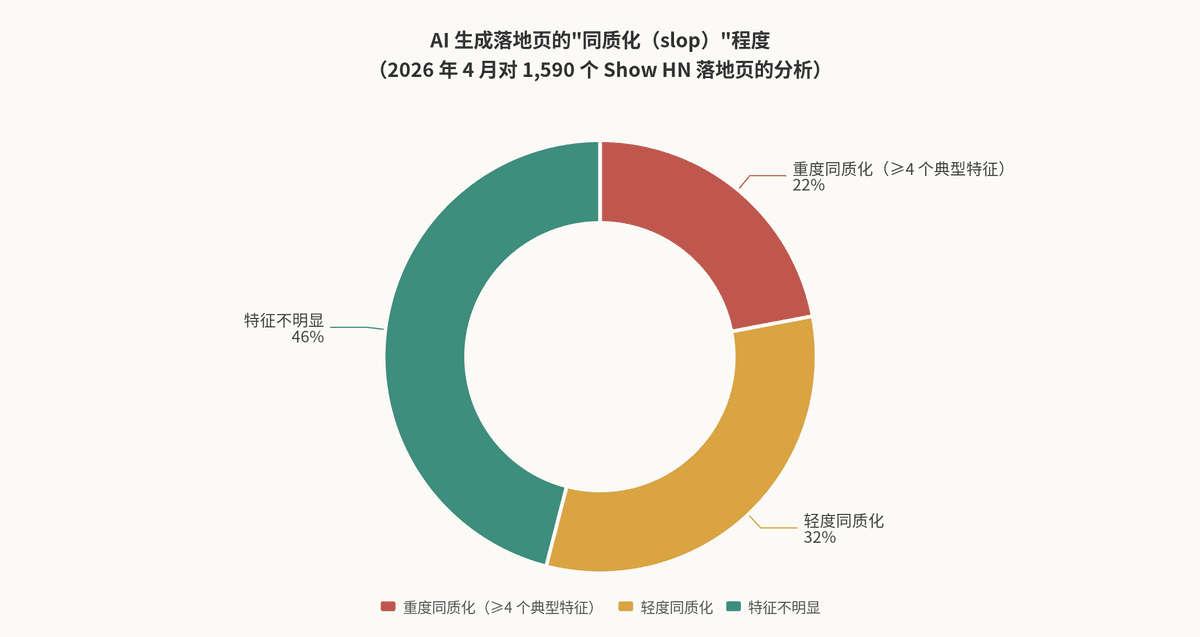
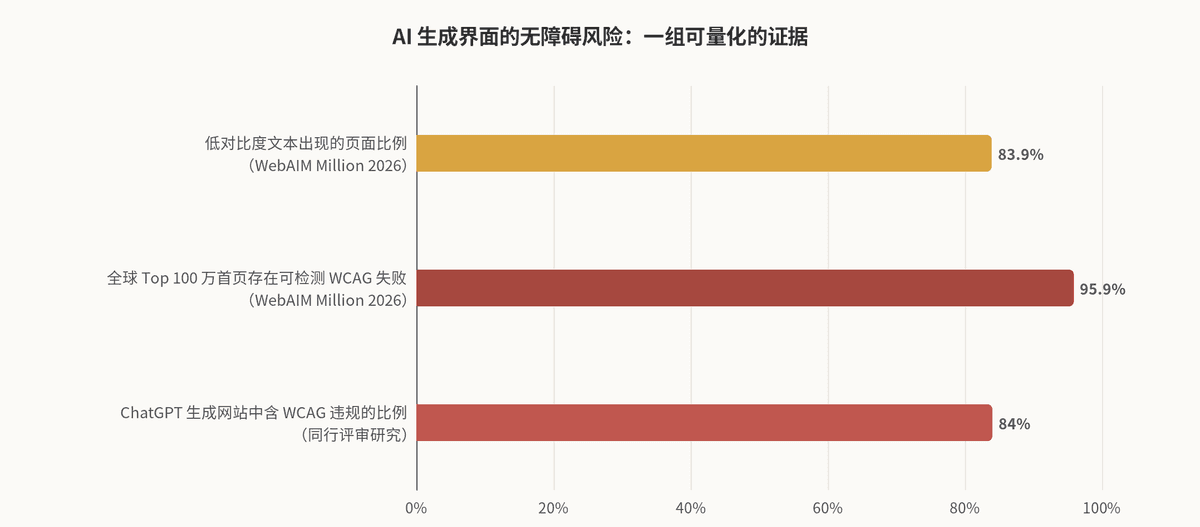
| Public-facing product interfaces, brand websites | Distinctive, accessibility-compliant, complete states | No by default, requires design system constraints + manual acceptance | Over half of AI landing pages exhibit homogeneity; 84% of AI-generated websites contain accessibility violations (Source) |
| High-traffic commercial products, strong brand-dependent scenarios | Conversion-oriented, emotional resonance, systemic consistency | No, requires designer leadership | "Speed without intent can only mass-produce mediocrity" (925Studios) |
Behind this table lies a structural fact: AI has driven the execution cost of UI down to nearly zero, but the judgment cost has actually increased. When anyone can generate nine directions in ten minutes, "which one to choose and why" becomes the only scarce ability—this is precisely why "taste" is repeatedly mentioned: it is not mysticism, but a learnable skill trained through "studying excellent works, articulating why they are good, and repeatedly practicing trade-offs" (houseofgai.com). By 2026, the design hiring market has already written this logic into job requirements: generating UI is no longer a skill but a prerequisite; the value lies in "knowing which AI output is correct and why it solves the problem" (DEV Community).
2.2 Optimistic Evidence: AI Output Has Crossed the "Usability Line"
The evidence supporting "it can be done" is concrete. The Design2Code benchmark built by Stanford and other institutions tested multimodal large models' "screenshot-to-code" capability using 484 real web pages. In human evaluations, annotators found that GPT-4V-generated pages could visually and content-wise replace the original page in 49% of cases, and were even considered better than the original in 46% of cases (arXiv.org). Note the precise meaning of this conclusion: it measures fidelity in replicating existing designs, not creating a correct design from scratch—the former is an execution problem, where AI is already quite strong; the latter is a judgment problem, precisely AI's weakness (the model still significantly lags in "recalling visual elements" and "generating correct layouts" (arXiv.org)).
Adoption data is equally optimistic. Figma's 2025 report shows 78% of respondents agree that "AI has significantly improved my work efficiency"; 80% of designers say AI tools help them collaborate better across functions (Figma). For non-designers, the disappearance of barriers is real: tools like Google Stitch and Claude Design are officially positioned to accept "business goals and feelings" as input, not design specifications—"the barrier is not design skills, but whether you know what the product needs to convey" (solguruz.com). Stitch offers 350 standard mode generations per month for free during beta (redwerk.com), Uizard Pro costs about $12/month (Hedrick), and the Chinese tool MasterGo gives 200 credits monthly (人人都是产品经理)—costs are already low enough to pose no barrier.
2.3 Negative Evidence: Three Quantified Failure Modes
Failure Mode One: Homogenization (AI slop). Because large models generate based on the statistical center of their training distribution, unconstrained AI UI converges to the same visual language: Inter font, purple-blue gradients, 8px rounded corner cards, centered Hero with three feature cards (925Studios). An analysis of 1,590 Show HN landing pages in April 2026 found that 22% were "severely homogenized" (containing 4+ identifiable features), with another 32% mildly so (Source)—in other words, over half of uncurated AI outputs "look identical to everyone else's." This purple gradient even has a clear origin: Tailwind creator Adam Wathan publicly apologized in August 2025 "for making every Tailwind UI button indigo five years ago, causing every AI-generated UI on earth to also be indigo" (Source). Academically, this is attributed to "typicality bias" in human preference data leading to RLHF mode collapse (Source). Homogenization is not an aesthetic purity issue: when a fintech company's website can become a CRM website just by changing the name, design loses its function of conveying brand, and visitors will leave and forget you (925Studios).
Failure Mode Two: Accessibility Deficiencies. This is the risk most thoroughly quantified in academic literature. The CodeA11y study published at CHI 2025 observed 16 novice developers without accessibility training using AI assistants and found three systemic problems: no one proactively mentions accessibility in prompts, over-trust in AI output leads to direct pasting (including submitting alt="" placeholders as-is), and inability to identify accessibility issues in the output (ACM Digital Library). Broader evidence: a peer-reviewed study found that 84% of websites generated by ChatGPT contain WCAG violations (BugPort); while WebAIM's 2026 annual scan of the global top 1 million homepages showed 95.9% of pages had detectable WCAG failures (averaging 56.1 errors per page), with the first regression in six years (errors up 10.1%), and WebAIM explicitly identified AI-assisted vibe coding as a potential driver (BugPort). The model's training set is this 96% failing internet; statistical priors ensure that "accessible output is the exception, not the default" (BugPort). Research at W4A '25 further shows that simply optimizing prompts only partially helps; the only consistently effective intervention is feeding automated scan results back into the generation loop (BugPort).
Failure Mode Three: Systematic Omission of States and Edge Cases. AI generates "portfolio interfaces"—populated, ideal, marketing-screenshot states. Almost no one publishes empty states or error pages in their portfolios, so when a model is asked to generate "a booking interface," it only produces the version it has seen tens of thousands of times (前端进阶之旅). A product with 28 main interfaces requires several times more actual artboards, because each interface is only complete when loading, empty, error, permission, offline, and other states are filled in—and these states are not visual variants but product decisions: the empty state must answer "is the user just starting, has the filter excluded everything, or is something wrong?" Three scenarios require three different copy texts and three different actions. The model cannot judge for you because the brief never provides this information, and it won't stop to ask (前端进阶之旅). This is why mature workflows require "states to be named before generation, not after" (前端进阶之旅), and domestic Spec-First programming practices list "missing edge cases—loading, empty states, permissions, exception branches" as fixed check items for manual review of AI solutions (博客园).
2.4 Summary: A Conditional "Yes"
Putting the three types of evidence together, the answer emerges: Those without design skills can use AI to produce UI that is "good enough", but the quality of "good enough" comes almost entirely from the workflow, not the model. Using the same model and the same prompt, bare use yields a statistical average of 22% severe homogenization (source); after applying a "constraints-first, closed-loop review" workflow, the output can pass the acceptance threshold (SmoothUI). Data from the development side corroborates this: an analysis of 470 real PRs in December 2025 found that the defect density of AI-generated code was 1.7 times that of human code, and security vulnerabilities were 2.74 times higher—AI amplifies the quality of the entire process, rather than automatically improving it (SmoothUI). The chasm in the Figma report—78% felt increased efficiency, but only 32% dared to trust the output (Figma)—measures the same thing.
III. Best Practices: A Reusable Closed-Loop Workflow
Synthesizing the public methodologies of practitioners from 2025–2026 (Eleken's eight-stage process, Vibe UI's five-step method, the anti-slop community's closed-loop approach, the Chinese community's five-dimensional framework, etc. (Eleken)), the details differ, but the skeleton is highly consistent. Below, I integrate them into a six-step closed loop and expand it into eight actionable principles.
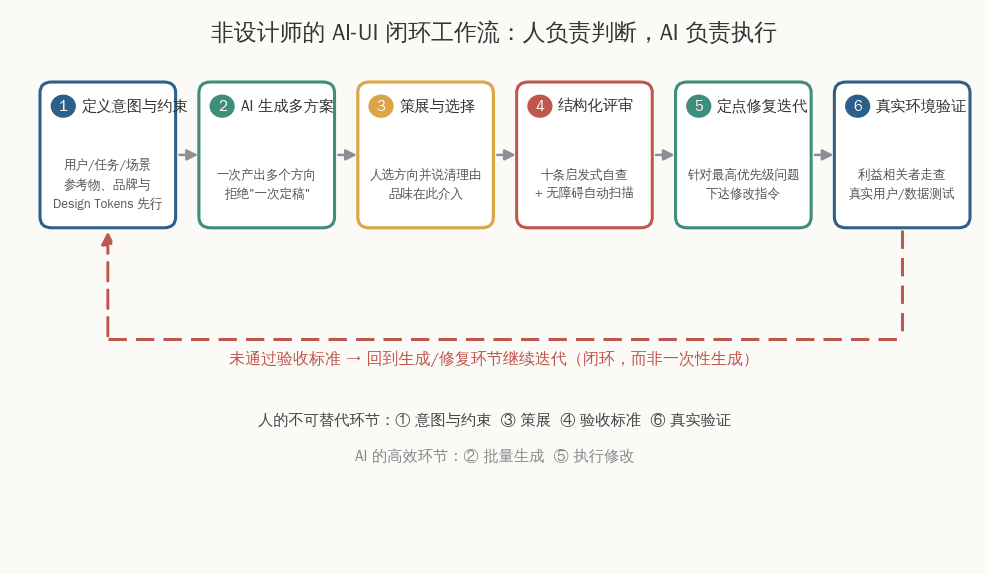
3.1 Principle 1: Think First, Then Open the Tool—Intent and Constraint Definition Are Your Only Moat
Multiple methodologies point out that the most common root cause of low-quality output is not the model, but the lack of decisions in the input. A widely circulated guide in the Chinese community suggests spending 15 minutes before starting to answer five questions: what problem does the product solve, a precise user persona ("25–35 year old tech lead at a startup" rather than "everyone"), aesthetic reference benchmarks, trust-building materials, and brand persona (WeChat (Geek Lean)). Alloy's practice guide also emphasizes "defining the creative direction before opening any tool," because vague input inevitably produces vague output (Alloy). For non-designers, this step is precisely something that does not require design skill—it is product thinking, which is exactly what PMs, founders, and developers should already be doing. Case studies on vibe coding also confirm this: the key to success is not knowing how to write CSS, but being "fluent enough in what you want the program to do" (ezyang's blog).
There are mature templates for writing prompts. The three core principles are: state clearly what you are doing (component type, elements included, target user), provide context that shapes decisions (user goal, product category, data volume), and iterate rather than over-design (start with a focused prompt, see the result, then refine) (Prototyper). A typical dashboard template looks like this: "Design a [type] dashboard for [user role] at [company type]. They need to monitor [key metrics] and take action on [primary tasks]. Include [specific sections]. Data updates [frequency]. The style direction is [visual description]." (Prototyper) The style description should be specific enough to be actionable—don't say "use nice colors," but rather "use deep midnight blue #1a202c as the primary color to convey professionalism and trust, warm gold #f6ad55 as the accent color, and ensure body text contrast is at least 4.5:1 to meet WCAG" (WeChat (Geek Lean)).
3.2 Principle 2: Outsource Taste to References—Reference-Driven Beats Adjective-Driven
The biggest weakness of non-designers is the inability to describe "good" in words, but they can point to "good." Almost all high-quality methodologies recommend using references instead of adjectives: show AI screenshots of websites you like, competitor interfaces, examples from Dribbble/Awwwards, and say "I like Stripe's gradients and whitespace, I want the premium feel of Linear's dark mode, and button interactions as natural as Notion's" (WeChat (Geek Lean)). References translate ineffable taste into visual constraints that the model can parse—this is the most economical way for non-designers to bridge the "taste gap." A more advanced approach is "style remixing": deconstruct elements from different styles (cyberpunk's neon accent colors, neumorphism's soft shadows, minimalism's whitespace), reassemble them by scenario, and actively break out of AI's default statistical center (WeChat (Geek Lean)).
Complementing the reference-driven approach is multi-option curation: never generate just once and look at only one draft. Alloy summarizes this as a cycle of "generate multiple directions—curate the strongest—refine through follow-up questions—validate with stakeholders," and specifically warns against a "prompt and pray" one-shot mentality (Alloy). A technique validated in practice is generate directions first, then generate interfaces: first have AI produce nine distinct brand direction boards (each with color palettes, font pairings, logo treatments), select one to lock in as a brand kit, then use it to generate specific pages—this way, the prompt handles layout, the kit handles identity, and the output is a "brand" rather than "a bunch of pages that happen to belong to the same company" (AIDesigner Templates).
3.3 Principle 3: Design Systems and Tokens First—Let AI Work in Your Language
This is the most important and counterintuitive principle for 2026: Reverse the order—don't ask for an interface first and hope it comes with a system; instead, build the system first, then let the interface grow from it (towardsai.net). Without constraints, AI improvises a miniature design system on the fly, discarding it after use, so every page becomes a new, poorly designed language (towardsai.net). The solution is to give AI less room to improvise: "Slop fills the gaps I leave, so I leave no gaps"—humans define color roles, font scales, spacing rules, components, and their combination rules (towardsai.net).
In engineering practice, the approach is to maintain an AI-referenceable constraints file (such as DESIGN.md or design tokens file) that clearly specifies color palettes, type scales, spacing logic, and component naming, serving as the single source of truth during generation (Eleken). Two key details: first, naming consistency—tokens and component names in Figma and code must follow the same logic; mismatched names are the biggest source of system drift (Eleken); second, build component by component—asking AI to generate an entire component library at once produces inconsistencies that take twice as long to clean up, while a prompt focused on a single button typically yields usable results (Eleken). Enterprise-grade tools have productized this logic: MasterGo's AI design assistant can deeply understand and invoke a company's existing design system to generate interfaces, and can also extract Design Tokens from design files in reverse; its D2C (design-to-code) achieves stable visual and structural fidelity of 85%–90% in practice at leading enterprises, reducing front-end UI restoration workload by an average of 40%–50% (Mastergo). Google Stitch's DESIGN.md feature follows the same path—extracting design rules from existing websites and storing them as portable files (Muzli).
3.4 Principle 4: Write the "state list" into the brief, naming exceptions before generation
For failure mode 3 in Section 2.3, the countermeasure is process-oriented: in the interface list, each screen comes with the complete set of states it needs, and these are defined while you still remember why the screen exists (Frontend Journey). Adding states later leads to a typical failure—the empty state inherits the layout of the original screen, resulting in a fake empty state with "all filters present but nothing to filter, full table headers but no data underneath" (Frontend Journey). The same applies to components: input fields have focus, filled, disabled, error, and read-only states; buttons have pressed, disabled, and loading states; checkboxes have an indeterminate state—if you decide to use a component, provide its full state matrix, regardless of whether any current page uses it (Frontend Journey). Domestic PMs have already standardized this step into fixed prompts in their workflows, such as directly telling AI "add an empty state page for 'network load failure' showing a 'Network error, click to retry' button" or "when clicking 'Buy Now' without being logged in, show a popup first" (人人都是产品经理). The essence of this principle is: AI won't ask you questions proactively, so you must ask all the questions on its behalf.
3.5 Principle 5: Structured review—replace "I think" with heuristic checklists and automated scans
Non-designers can't rely on intuition for review, but they can rely on checklists. Jakob Nielsen's ten usability heuristics (visibility of system status, match between system and the real world, user control and freedom, consistency and standards, error prevention, recognition rather than recall, flexibility and efficiency of use, aesthetic and minimalist design, help users recognize and recover from errors, help and documentation) stem from a factor analysis of 249 usability problems, covering about 85% of usability issues, and remain valid across three decades of platform changes—because they are based on fundamental differences between humans and machines, not specific technologies (Theseus). Nielsen Norman Group even offers a free evaluation workbook with check questions for each heuristic ("Does the design clearly communicate the current state?" "Can users easily cancel an action?"), which anyone can follow step by step (nngroup.com). Two usage points: a single evaluator finds on average only about 35% of usability problems; 3–5 independent evaluators who then combine results work much better (fuselabcreative.com); heuristic evaluation cannot replace real user testing—the two are complementary (The Decision Lab).
On accessibility, the conclusion is clear: prompts help, but verification is what works—feeding automated WCAG scan results (e.g., from axe) back to AI for fixes is the only intervention that consistently improves outcomes in research (BugPort). For non-designers, the practical steps are: scan on every build (not quarterly), treat scan results as bug tickets, and manually inspect semantic layers that automation can't test, such as keyboard behavior and focus order (BugPort). The CHI 2025 CodeA11y study shows that even adding a simple "remind humans to verify placeholders" mechanism to an AI assistant significantly improves accessibility output for novices (ACM Digital Library)—the core idea is adding friction to "over-trust."
3.6 Principle 6: Close the loop iteratively, not one-shot generation
Treating AI design as a "one-shot deal" is the biggest quality killer: the agent generates, you skim through, manually fix the same issues, and it repeats them next time (SmoothUI). What truly makes a difference is closing the loop—generate with guardrails → review against explicit acceptance criteria → fix the highest-priority issues → re-check, until you pass the criteria or exhaust the budget (SmoothUI). Anti-slop tools (like UI Craft, Hallmark) automate this logic: 65 slop detection gates, self-criticism before generation, regeneration when anti-patterns are hit, and once corrected, the rule is recorded in project rules to prevent recurrence (SmoothUI). Even without these tools, non-designers should manually replicate this loop: set a checkable acceptance line for yourself ("Would a designer want to redo this page?"), check off each item, and don't approve until everything is green (SmoothUI). The Spec-First workflow in the Chinese community offers the same mindset: the cost of correction is lowest at the spec stage; human review focuses on five types of issues—requirement understanding deviations, out-of-scope changes, incorrect reuse order, unstated assumptions, and missed edge cases—and only after both parties agree on the spec does implementation begin (博客园).
3.7 Principle 7: Real validation is the final gate, and it cannot be outsourced to AI
Synthetic users were all the rage in 2025, but Nielsen Norman Group's controlled tests gave a sobering conclusion: synthetic users are barely acceptable for broad attitudinal questions, but their answers are "one-dimensional," sycophantic (praising every concept), and their behavior predictions are detached from reality (real users don't browse forums, yet synthetic users enthusiastically describe forum participation)—they can only be used for desk research and preparing for real research, never for final decisions (IxDF - Interaction Design Foundation). This means the final quality gate for non-designers remains traditional actions: find 3–5 real users or colleagues to complete core tasks and observe where they get stuck, fill interfaces with real data to see if layouts break, and have stakeholders click through interactive prototypes rather than look at static images (Alloy). Notably, the shift in deliverable forms actually helps non-designers: AI has drastically lowered the cost of "interactive prototypes with real data," and clients and decision-makers are no longer satisfied with static Figma files—they want to "feel the product's hand before a single line of production code is written"—which is exactly what non-designers can achieve with AI (Eleken).
3.8 Principle 8: Know when to hand off—the human review gate is an indispensable institutional design
A phrase repeatedly cited in 2026 is: "Treat AI as an accelerator for exploration, and human designers as the quality gate for everything that goes live" (redwerk.com). This is not conservatism, but rather a pricing of the cost of failure: the cost of interface errors in internal tools approaches zero, while the cost of errors on a brand's homepage is conversion rate and trust (925Studios). The institutional implementation is very light: anything intended for real users goes through "someone who knows"—in-house designers, external consultants, or even a paid review. Figma's skills report supports the value of collaboration: 80% of designers believe AI tools improve collaboration quality, and the collaboration model is shifting from "clear handoffs" to "a fluid partnership from strategy to launch" (Figma)—the best positioning for non-designers is not "replacing designers," but "bringing an 80% draft to the designer, so their time is spent on the final 20% of judgment."
4. Tool Selection Reference (Mid-2026)
4.1 Overseas Tools
| Tool | Positioning | Input Method | Export | Free Tier/Pricing | Non-Designer Friendliness |
|---|---|---|---|---|---|
| Google Stitch | Text-to-multi-screen UI, infinite canvas + voice input, DESIGN.md extracts design rules | Text/Image/Voice | Figma, Code | Free beta, 350 times/month (standard mode) (redwerk.com) | High: Accepts "business goals + feel" as input (solguruz.com) |
| Uizard | Rapid prototyping for non-designers, Autodesigner 2.0 | Text/Sketch photo/Screenshot | Limited export | Free 3 times/month; Pro $12/month (Hedrick) | High: For founders and PMs to validate concepts (Hedrick) |
| Figma (First Draft/Make) | Professional tool with embedded AI, for team and design system scenarios | Text/Figma context | Figma native | Free tier 150 AI credits/day; from $16/seat/month (Hedrick) | Medium: Steeper learning curve, but the collaboration standard (Asian Efficiency) |
| v0 (Vercel) | Text-to-runnable components/pages, React+Tailwind+shadcn | Text/Image | Code + Deployment | Free tier + from $20/month (banani.co) | Medium: Requires basic technical concepts, highest visual completion in reviews (Muzli - Design Inspiration) |
| Lovable / Bolt.new | Text-to-full-stack applications | Text | Hosted application | From $25/month (banani.co) | Medium-High: One-sentence app generation, but noticeable homogenization (Muzli) |
| Relume | Sitemap + wireframe generation | Text | Figma/React | From $26/month (banani.co) | Medium: More for website information architecture |
| Canva | General visual assets (not strictly UI) | Templates + AI | Image/PDF/Web | Free; Pro $10/month (Asian Efficiency) | Extremely High: Covers about 80% of non-designers' daily visual needs (Asian Efficiency) |
4.2 Chinese Tools
| Tool | Positioning | Features | Non-Designer Friendliness |
|---|---|---|---|
| MasterGo (BlueLake) AI Quick Build | Multimodal text-to-UI + editable canvas + D2C to code | Output is vector editable layers, supports local box-selection modification; can call enterprise design systems; D2C restoration rate 85%–90% (Mastergo) | High: Conversation is design, canvas allows secondary refinement (Mastergo) |
| MockingBot AI | 30-second text-to-editable high-fidelity prototype + PRD generation | Supports sketch/screenshot input, multi-turn dialogue revisions, one-click share presentation (MockingBot) | High: Positioned as the "product manager's intelligent agent" (MockingBot) |
| JsDesign | Domestic Figma alternative + AI revision | Issue natural language modification commands on existing pages ("make it cleaner"), smooth Chinese experience (WeChat Official Account (Zhi Xiaoyuan AI Talk)) | High: Near-zero learning cost (WeChat Official Account (Zhi Xiaoyuan AI Talk)) |
| Pixso | Privately deployed collaborative design | Finance/government project-oriented, launched real-time 3D prototyping in 2025 (Source) | Medium |
| Tongyi Wanxiang / Gaoding AI | E-commerce and marketing visual assets | Optimized for Chinese context, e-commerce template library over 100,000 sets (Source) | High (more for marketing assets than product UI) |
Tool selection principles can be condensed into one sentence: During the ideation phase, use text-to-design tools to explore directions (Stitch/MasterGo/MockingBot); during the definition phase, move to an editable canvas for refinement; during the delivery phase, use design-system-constrained D2C or code generation; and for brand-critical scenarios, involve designers. A common and effective combination is: use Figma AI/Stitch to quickly generate multiple options during the concept phase → use v0/Lovable to generate interactive code after selection → use general large models for detail optimization (WeChat Official Account (Geek Lean)).
5. Boundaries: When a Designer is Essential
Synthesizing all evidence, the "AI + non-designer" combination has three hard boundaries, and crossing any one of them requires hiring a professional designer to lead:
Beyond these boundaries lies a subtler soft edge: when "good enough" is no longer enough. Once AI reduces the cost of meeting the bar to zero, the bar itself inflates—when everyone's landing page is generated in ten minutes, "not ugly" no longer constitutes any advantage. The flip side of design democratization is the upward shift of quality control: anyone can assemble a decent-looking interface, but not everyone can tell whether that interface communicates what it should (UX Magazine). This is why the World Economic Forum still projects rising demand for design and UX skills through 2027, and why Nielsen Norman Group stated in May 2025 that design professionals are "not in danger of being replaced by current AI tools" (Sciencetify)—what is being replaced is not designers, but the "execution-only" way of working; what is being raised is not the ceiling, but the floor (Alloy).
VI. Capability-Building Paths for Non-Designers
Finally, let's distill "best practices" into an actionable growth checklist. Non-designers don't need to become designers, but they do need to build three minimal capabilities:
First, taste (the ability to tell good from bad). This is the highest-ROI capability. The method is to deliberately build "reference library literacy": regularly save excellent interfaces (Awwwards, Mobbin, Page Collective, etc.) and write one sentence per save on "why it's good"—research shows that taste is trained precisely through reference literacy, critique practice, and iterative trade-offs (houseofgai.com). When AI makes execution abundant, the scarce skill is "guiding better decisions" (houseofgai.com).
Second, structured expression (the ability to articulate intent). Translate "make it prettier" into actionable language: learn a basic vocabulary—hierarchy, contrast, whitespace, alignment, consistency—plus ten heuristics as a checking framework (Theseus). A few immediately usable empirical numbers: heading-to-body font-size ratio of at least 2:1, spacing in 8px multiples, body text contrast of at least 4.5:1, and compact/comfortable/spacious layouts at 1:1.5:2 spacing ratios (微信公众号(极客精益)). These aren't design education—they're prompt ammunition.
Third, process discipline (the ability to hold the line). Consistently execute six actions: write a complete state checklist in the brief (前端进阶之旅); create constraint files first (Eleken); generate at least three directions before choosing (Alloy); run through the ten heuristics (Nielsen Norman Group); run an accessibility scan and feed results back to AI for fixes (BugPort); and test with real people before launch (IxDF - Interaction Design Foundation). This discipline doesn't change your design ability—it changes the expected quality of AI output.
Conclusion
Back to the original question: can someone without design skills produce sufficiently good UI interactions? In 2026, the answer is a conditional yes—the condition lies not in the model, but in your hands. AI has solved the "from zero to decent" problem, and that's historic democratization; what it hasn't solved—and architecturally struggles to solve—is the "from decent to correct" and "from correct to distinctive" problem—because both are fundamentally judgment problems, and judgment is precisely what can't emerge from the statistical center of a training distribution (source). The best strategy for non-designers isn't to compete with AI on execution, nor to compete with designers on taste, but to become the person who knows what the product should communicate, holds the acceptance criteria, and knows when to bring in professionals (solguruz.com). Tools change every six months; this principle will not go out of date.